Blog / Code & convert EAs · MQL5 · Expert Advisors
Hedging vs Netting Accounts: Why Your EA Breaks on One of Them
Understand MT5 hedging and netting accounts, how they affect EA positions, and how to make your MQL5 trading system account-compatible.
· 7 min read
An Expert Advisor can compile successfully, pass backtesting and still behave unexpectedly when installed on a different MT5 trading account.
One possible reason is the account's position-accounting mode.
MetaTrader 5 supports two main position-accounting systems: hedging and netting. They determine how the platform handles multiple trades on the same instrument, including what happens when an EA opens an opposite-direction trade.
An EA designed to manage several independent positions may work correctly on a hedging account but behave differently on a netting account.
To prevent this, you need to understand how each account type handles trades and adapt your EA's position-management logic accordingly.
1. How Hedging Accounts Handle Positions
A hedging account allows multiple independent positions to exist on the same instrument.
For example, an EA can open two Buy positions on EURUSD and then open a Sell position without automatically combining all three into one position.
Consider this example:
| Position | Direction | Volume |
|---|---|---|
| Position 1 | Buy EURUSD | 0.10 |
| Position 2 | Buy EURUSD | 0.20 |
| Position 3 | Sell EURUSD | 0.15 |
All three positions can remain open independently.
Each position has its own ticket and can have separate stop-loss and take-profit levels.
This account type is useful for strategies that:
- Open multiple entries at different price levels.
- Use grid or averaging systems.
- Maintain opposing Buy and Sell positions.
- Run multiple strategies on the same instrument.
- Manage individual trades independently.
However, your EA must select the correct position before modifying or closing it. Selecting a symbol alone may not identify the trade you intended to manage.
2. How Netting Accounts Handle Positions
A netting account maintains only one open position per symbol.
Additional trades change the existing position instead of creating separate independent positions.
For example:
| Transaction | Direction | Volume | Resulting position |
|---|---|---|---|
| Initial trade | Buy | 0.10 | Buy 0.10 |
| Second trade | Buy | 0.20 | Buy 0.30 |
| Third trade | Sell | 0.15 | Buy 0.15 |
The third transaction reduces the existing Buy exposure rather than creating a separate Sell position.
If the Sell transaction equals the existing Buy volume, the position becomes flat. If it exceeds the existing Buy volume, the resulting position reverses to Sell.
This affects EAs that expect every successful trade request to create a new position.
For example, a strategy that tracks the stop-loss, take-profit and profit of each individual entry cannot assume that those entries will remain separate on a netting account.
Important: Exchange accounts also use netting-style position accounting. MT5 distinguishes retail netting, exchange and retail hedging through the account's margin mode.
3. Hedging vs Netting: The Main Differences
| Feature | Hedging account | Netting account |
|---|---|---|
| Multiple positions on one symbol | Allowed | One net position |
| Opposite-direction trade | Can open a separate position | Reduces, closes or reverses exposure |
| Independent position tickets | Yes | One open position per symbol |
| Separate SL/TP per position | Supported | Managed at the combined-position level |
| Individual entry management | Supported | Requires additional internal tracking if needed |
| Typical strategy use | Multiple entries and opposing trades | Combined exposure management |
The key difference is how the account processes transactions into positions.
An EA must therefore be designed around the position behaviour its strategy requires.
4. How to Detect the Account Type in MQL5
Before an EA starts trading, it can check the account's margin mode using AccountInfoInteger() and ACCOUNT_MARGIN_MODE.
Use this function:
void CheckAccountMode()
{
   ENUM_ACCOUNT_MARGIN_MODE mode =
      (ENUM_ACCOUNT_MARGIN_MODE)
      AccountInfoInteger(ACCOUNT_MARGIN_MODE);

   switch(mode)
   {
      case ACCOUNT_MARGIN_MODE_RETAIL_HEDGING:
         Print("Account type: Retail Hedging");
         break;

      case ACCOUNT_MARGIN_MODE_RETAIL_NETTING:
         Print("Account type: Retail Netting");
         break;

      case ACCOUNT_MARGIN_MODE_EXCHANGE:
         Print("Account type: Exchange Netting");
         break;

      default:
         Print("Unknown account margin mode.");
         break;
   }
}
The three main values are:
ACCOUNT_MARGIN_MODE_RETAIL_HEDGINGACCOUNT_MARGIN_MODE_RETAIL_NETTINGACCOUNT_MARGIN_MODE_EXCHANGE
This allows the EA to identify the account environment before executing strategy-specific logic.
For example, if a strategy requires multiple independent positions on the same symbol, the EA can detect a netting account and refuse to trade rather than silently running with incompatible assumptions.
5. Why Position Selection Can Break on a Hedging Account
A common programming mistake is assuming that selecting a position by symbol identifies the specific trade an EA wants to manage.
Consider:
if(PositionSelect(_Symbol))
{
   double volume = PositionGetDouble(
      POSITION_VOLUME
   );
}
This selects a position on the current symbol. However, if multiple positions exist on a hedging account, PositionSelect(_Symbol) selects the position with the lowest ticket.
It does not automatically select the position belonging to a particular EA or trading signal.
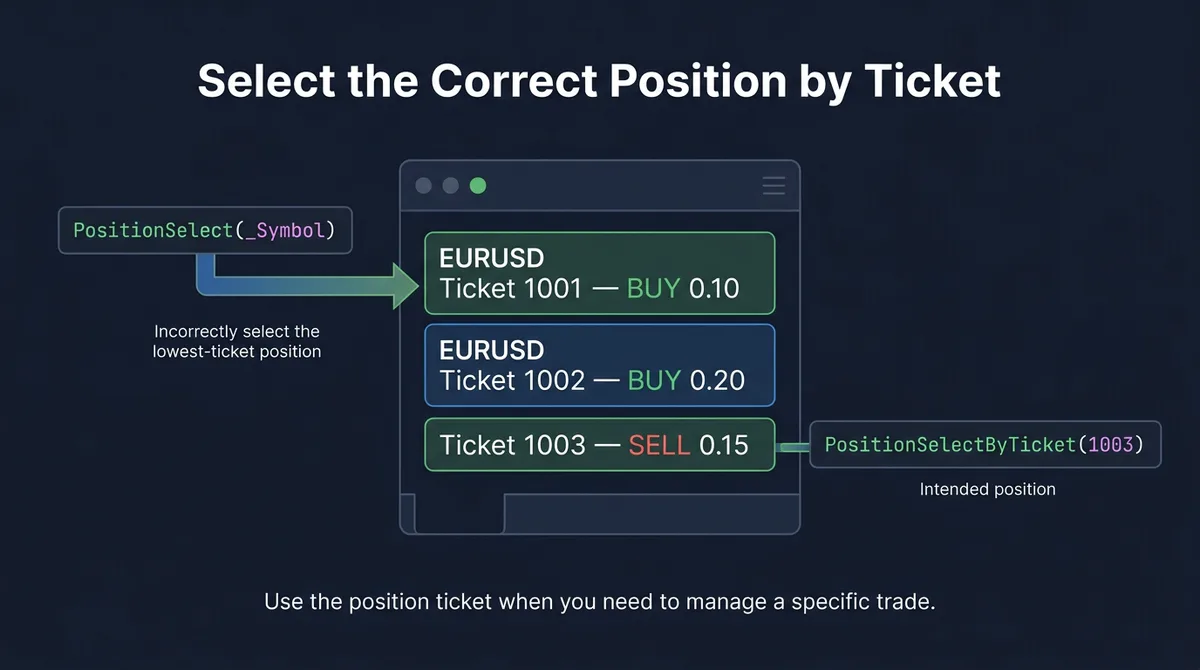
If you need to manage a specific position, select it by ticket:
ulong ticket = 123456789;

if(PositionSelectByTicket(ticket))
{
   double volume = PositionGetDouble(
      POSITION_VOLUME
   );

   Print("Position ticket: ", ticket);
   Print("Position volume: ", volume);
}
else
{
   Print("Unable to select position. Error: ",
         GetLastError());
}
Replace the example ticket with the actual ticket your EA is tracking.
For an EA managing several positions, iterate through the open positions and filter them using the symbol and magic number:
for(int i = PositionsTotal() - 1; i >= 0; i--)
{
   ulong ticket = PositionGetTicket(i);

   if(ticket == 0)
      continue;

   if(!PositionSelectByTicket(ticket))
      continue;

   string symbol = PositionGetString(
      POSITION_SYMBOL
   );

   long magic = PositionGetInteger(
      POSITION_MAGIC
   );

   if(symbol == _Symbol && magic == 12345)
   {
      double volume = PositionGetDouble(
         POSITION_VOLUME
      );

      Print("EA position ticket: ", ticket);
      Print("Position volume: ", volume);
   }
}
This is useful when multiple EAs operate on the same account.
However, there is an important limitation on netting accounts: a single position represents the combined exposure from one or more deals. Its position-level magic number cannot reliably separate the contributions of different strategies.
If multiple EAs need independent management of the same symbol on a netting account, consider using a central position manager or separate trading accounts.
6. How Opposite Trades Affect EA Logic
Another major source of compatibility problems is how an EA handles opposite-direction signals.
Suppose a strategy opens a Buy position and later receives a Sell signal.
On a hedging account, the EA can open a separate Sell position while leaving the Buy position open.
On a netting account, the Sell transaction changes the existing exposure.
This can break strategies that rely on:
- Maintaining separate Buy and Sell positions.
- Closing only one individual entry.
- Tracking the profit of each entry independently.
- Applying different stop-loss levels to separate positions.
- Running multiple strategies independently on one instrument.
The developer must decide whether the original strategy requires these behaviours or whether it can operate using one combined net position.
Simply allowing the EA to submit opposite orders without reviewing its position-management logic can produce unexpected results.
7. How to Make an EA Compatible With Both Account Types
An EA can support both account types, but its position-management logic must account for their differences.
Start by checking the account mode during initialisation:
int OnInit()
{
   ENUM_ACCOUNT_MARGIN_MODE mode =
      (ENUM_ACCOUNT_MARGIN_MODE)
      AccountInfoInteger(ACCOUNT_MARGIN_MODE);

   if(mode == ACCOUNT_MARGIN_MODE_RETAIL_HEDGING)
   {
      Print("EA running on a hedging account.");
   }
   else if(mode == ACCOUNT_MARGIN_MODE_RETAIL_NETTING ||
           mode == ACCOUNT_MARGIN_MODE_EXCHANGE)
   {
      Print("EA running on a netting account.");
   }
   else
   {
      Print("Unsupported account mode.");
      return INIT_FAILED;
   }

   return INIT_SUCCEEDED;
}
This allows the EA to identify the account environment before trading. However, detecting the account type does not automatically make the EA compatible with it. The appropriate position-management logic must also be implemented.
Follow these guidelines:
Use ticket-based management when individual positions matter.
On hedging accounts, use position tickets to identify and manage specific trades. Avoid relying on symbol-based selection when multiple positions may exist.
Do not assume an opposite order creates a new position.
On netting accounts, an opposite transaction may reduce, close or reverse the existing position.
Review stop-loss and take-profit handling.
On a hedging account, separate positions can have independent protective levels. On a netting account, the EA manages protective levels for the combined position.
Maintain internal strategy records where necessary.
If an EA needs to track individual entry signals on a netting account, it can maintain its own records of those entries and their intended management rules. These records do not create separate broker-held positions.
Test both account modes.
If the EA is advertised as compatible with hedging and netting accounts, test its actual position management on both types, for example on a demo account of each kind. Successful compilation alone does not establish compatibility.
8. How to Diagnose an EA That Behaves Differently Across Account Types
If an EA opens trades correctly on one account but produces unexpected results on another, start by checking its assumptions about position management.
| Observed problem | What to investigate |
|---|---|
| Opposite trade reduces or closes an existing position | Confirm whether the account uses netting |
| Multiple entries appear as one position | Check the account's margin mode |
| EA modifies the wrong position | Review symbol-based selection and use ticket-based selection |
| Separate stop-loss levels are not maintained | Check whether the EA assumes hedging behaviour |
| Multiple strategies interfere with each other | Review shared symbol exposure and magic-number handling |
| EA refuses to start on another account | Inspect account-mode restrictions in OnInit() |
| Position volume differs from individual trade volumes | Check how transactions are combined under netting |
The MT5 Experts and Journal tabs can also help identify trade requests and execution responses.
When diagnosing the problem, compare the same EA, symbol and trading conditions across both account types where possible. This makes it easier to isolate whether the difference comes from account behaviour or another variable.
Conclusion
Hedging and netting accounts handle positions differently, and that difference can significantly affect how an MT5 Expert Advisor operates.
A hedging account supports multiple independent positions on the same symbol, while a netting account combines transactions into one net position per instrument.
An EA that assumes every trade creates a separate position may therefore work as expected on a hedging account but behave incorrectly on a netting account.
The solution is to identify the account's margin mode, understand how transactions affect positions and implement suitable position-management logic for each account type.
Build a bot from your idea
Describe your trading idea and the AI writes MT4 or MT5 code for you to review and test, with a plain-English explanation and setup steps. Your first bot is free.