Blog / Markets & prop firms · Prop firms · Expert Advisors · Risk management
Can You Use an EA on a Prop Firm Challenge?
Find out whether prop firms allow Expert Advisors, what restrictions apply, and how to prepare your MT5 EA for a trading challenge.
· 6 min read
Automated trading can make it easier to execute a strategy consistently, manage positions, and enforce predefined risk limits. But if you're planning to use an Expert Advisor (EA) during a prop firm challenge, there's an important question to answer first: does the firm actually allow it?
The answer is not always straightforward.
Some prop firms permit automated trading throughout their evaluation and funded stages. Others restrict third-party EAs, require traders to own their source code, or prohibit automation on certain account types.
Even when EAs are allowed, the strategy must comply with the firm's trading rules.
Here's what to check before running an MT5 Expert Advisor on a prop firm account.
1. Check whether the prop firm permits EAs
Never assume that a prop firm's acceptance of MetaTrader 5 automatically means it permits automated trading.
Platform availability and EA permissions are separate matters.
Some firms allow EAs during challenges but prohibit them on funded accounts. Others allow automation throughout both stages, subject to restrictions.
Before purchasing a challenge, check the firm's official documentation for:
- Whether fully automated trading is permitted.
- Whether the policy applies to both evaluation and funded accounts.
- Whether third-party or commercially purchased EAs are accepted.
- Whether you must own or provide the EA's source code.
- Whether there are restrictions on trade copiers or automated trade management.
- Whether certain account types have different automation rules.
If the policy is unclear, contact the firm's support team and request written clarification before using the EA.
2. Understand the difference between personal and third-party EAs
One of the most important distinctions in prop firm rules is EA ownership.
A firm may permit an EA that you developed yourself but prohibit commercially available bots purchased from another developer.
Other firms may allow third-party EAs but impose restrictions on shared strategies, copied trades, or identical trading activity across multiple accounts.
For example, some firms require proof that you own the EA's source code. Others allow automation but restrict the use of strategies that exploit platform execution or pricing differences.
This means that purchasing an EA from the MQL5 Market does not automatically make it acceptable for a prop firm challenge.
Before using a third-party EA, establish whether the firm's rules allow it and whether any additional conditions apply.
3. Check which automated trading strategies are prohibited
An EA can be technically permitted while its underlying trading method remains prohibited.
Prop firms commonly restrict practices they consider abusive, exploitative, or inconsistent with their trading objectives.
Depending on the firm, restrictions may include:
- High-frequency trading: Excessive automated activity designed to exploit execution speed or platform behaviour.
- Latency arbitrage: Exploiting delays or differences between price feeds.
- Certain arbitrage strategies: Using pricing discrepancies or coordinated positions to generate unfair advantages.
- Martingale strategies: Increasing position sizes after losses to recover previous losses.
- Prohibited copy trading: Automatically reproducing another trader's positions without permission.
- Grid strategies: Some firms restrict particular forms of grid trading, especially where they create excessive or uncontrolled exposure.
These restrictions are not universal. A strategy permitted by one firm may be prohibited by another.
The important point is that permission to use an EA is not permission to use every automated trading strategy.
4. Make sure your EA respects the firm's risk limits
This is where EA development becomes particularly important.
A prop firm challenge may impose several account-level restrictions, including:
- Maximum daily loss.
- Maximum overall drawdown, which can be static or trailing.
- Maximum position size.
- Restrictions on holding positions overnight or over weekends.
- News-trading restrictions.
- Minimum or maximum trade durations.
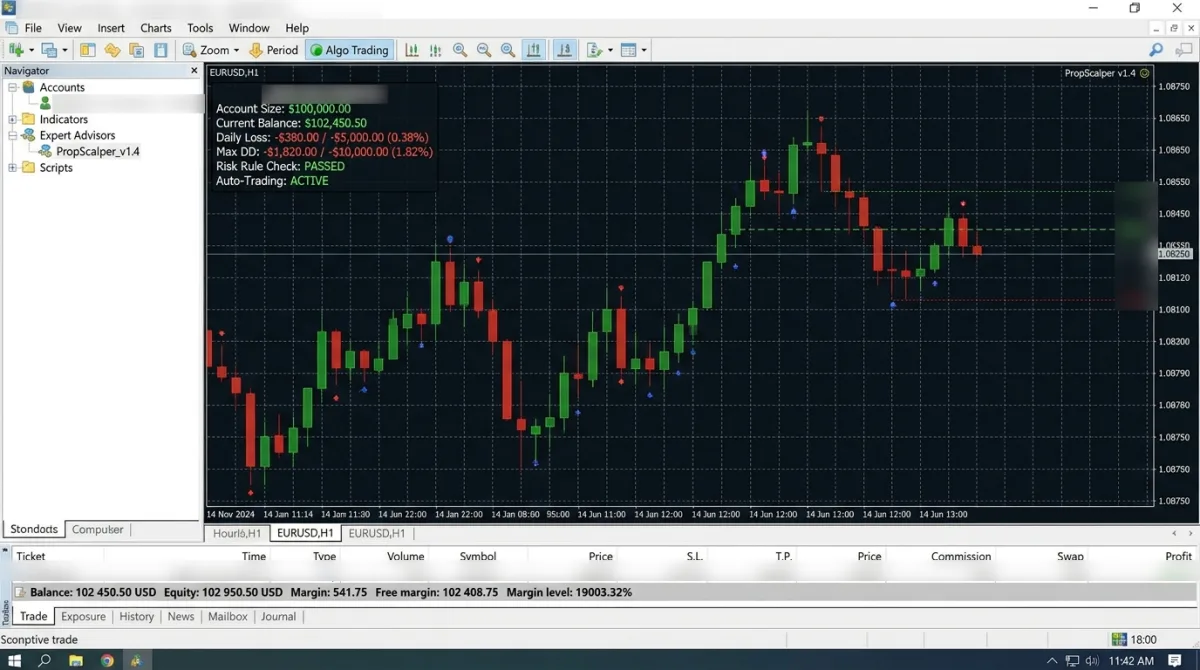
Your EA should be designed around the actual rules of the account rather than relying on its ordinary trading strategy alone.
For example, an EA that calculates position sizes using a fixed percentage of the initial account balance may continue opening trades even when the account approaches its daily loss limit.
A more suitable implementation should monitor the relevant account balance or equity, calculate remaining risk allowance, and prevent new entries when the applicable limit has been reached. Coding a Daily Loss Limit into Your EA shows one way to do it in MQL5.
It should also account for floating losses, open positions, commissions, and other costs where the firm's rules include them.
Remember that an EA's internal risk controls are safeguards, not a guarantee against a prop firm breach. Unexpected execution conditions, price gaps, and platform interruptions can still affect account equity.
5. Test your EA under prop firm conditions
An EA that performs well on a personal trading account may behave differently under a prop firm's restrictions.
Before deploying it, reproduce the important account conditions as closely as possible.
For example:
- Starting capital: $100,000
- Daily loss limit: 5%
- Maximum overall loss: 10%
These are illustrative values, not universal prop firm limits. Use the numbers from your own challenge.
Test whether the EA:
- Calculates position sizes correctly for the account.
- Stops opening new positions when the daily loss limit is reached.
- Respects the maximum overall drawdown.
- Accounts for floating losses and simultaneous positions.
- Handles trading-session and news restrictions where applicable (Coding a News Filter for Prop Firm Rules in MQL5 covers the news part).
- Avoids prohibited trading behaviour.
- Recovers safely after a terminal restart or temporary connection failure.
Also test its behaviour when trades are rejected, execution is delayed, or market conditions change unexpectedly.
Do not assume that a strategy passes a prop firm's rules simply because its historical results look good.
6. Be careful with VPS, trade copiers and account restrictions
Some automated strategies require a Virtual Private Server (VPS) to keep MetaTrader running continuously.
However, prop firms may impose their own restrictions on VPS usage, VPNs, proxies, remote access, and other hosting arrangements.
Trade copiers also deserve particular attention. A firm may permit copying between accounts belonging to the same trader but prohibit copying another person's trades or using an unauthorised third-party signal service.
Check the rules covering:
- VPS and remote hosting.
- VPN and proxy usage.
- Trade copying between your own accounts.
- Copying trades from other traders.
- Identical or coordinated trading across multiple accounts.
Do not assume that a tool is permitted simply because it is available in MT5.
7. Get confirmation before starting the challenge
The safest approach is to review the rules before paying for an evaluation.
A simple pre-challenge checklist can help:
- Confirm that EAs are permitted on your chosen account type.
- Establish whether personal and third-party EAs are treated differently.
- Check restrictions on the EA's trading strategy.
- Confirm whether source-code ownership or disclosure is required.
- Review daily loss and maximum drawdown calculations.
- Check news, weekend, and holding-time restrictions.
- Confirm VPS, VPN, and trade copier policies.
- Ask support for written clarification where necessary.
- Test the EA against the applicable rules before deployment.
Keep a copy of the rules you relied on and the support response, including the date. Policies can change, and the conditions attached to a particular challenge may differ from those of another account offered by the same firm.
Conclusion
Yes, you can use an Expert Advisor on some prop firm challenges, but permission depends on the firm's rules, account type, evaluation stage, and the EA's trading behaviour.
Before deploying an automated strategy, establish whether the firm permits it, check restrictions on third-party software, and make sure its risk controls reflect the account's actual drawdown and trading limits.
An EA's results only matter on a prop firm account if it can operate within the firm's rules.
For a broader overview of these requirements, read The Most Important Prop Firm Rules.
PositionAlpha's Prop Firm Shield adds your challenge's limits to an MT5 EA as prewritten code. Every order the EA sends passes through it, and it closes everything and stops at the daily and overall loss lines you set below the firm's limits. The AI also reads the EA and reports what could still cost you the challenge. Compile the result in MetaEditor and test it on a demo account before you rely on it; it can't prevent a loss.
Build a bot from your idea
Describe your trading idea and the AI writes MT4 or MT5 code for you to review and test, with a plain-English explanation and setup steps. Your first bot is free.