Blog / Code & convert EAs · Backtesting · Expert Advisors
Spread, Commission and Slippage: Making Your MT5 Backtest Realistic
Learn how to account for spread, commission and slippage in MT5 backtests so your Expert Advisor's results reflect real trading costs.
· 7 min read
An Expert Advisor can look profitable in the MetaTrader 5 Strategy Tester but produce very different results when connected to a live trading account.
One reason is that trading involves costs and execution conditions that can significantly affect results. Spread, commission and slippage may seem small on individual trades, but they can accumulate quickly, especially for scalping strategies and high-frequency EAs.
If your backtest does not account for these factors properly, you may be evaluating a strategy under conditions that are far better than those it will encounter in live trading.
Let's look at how to account for them in MT5.
1. Understand the impact of spread
Spread is the difference between the Bid and Ask prices of a financial instrument.
When you open a Buy position, you generally enter at the Ask price. When you open a Sell position, you generally enter at the Bid price.
This means a position starts with an immediate cost represented by the spread.
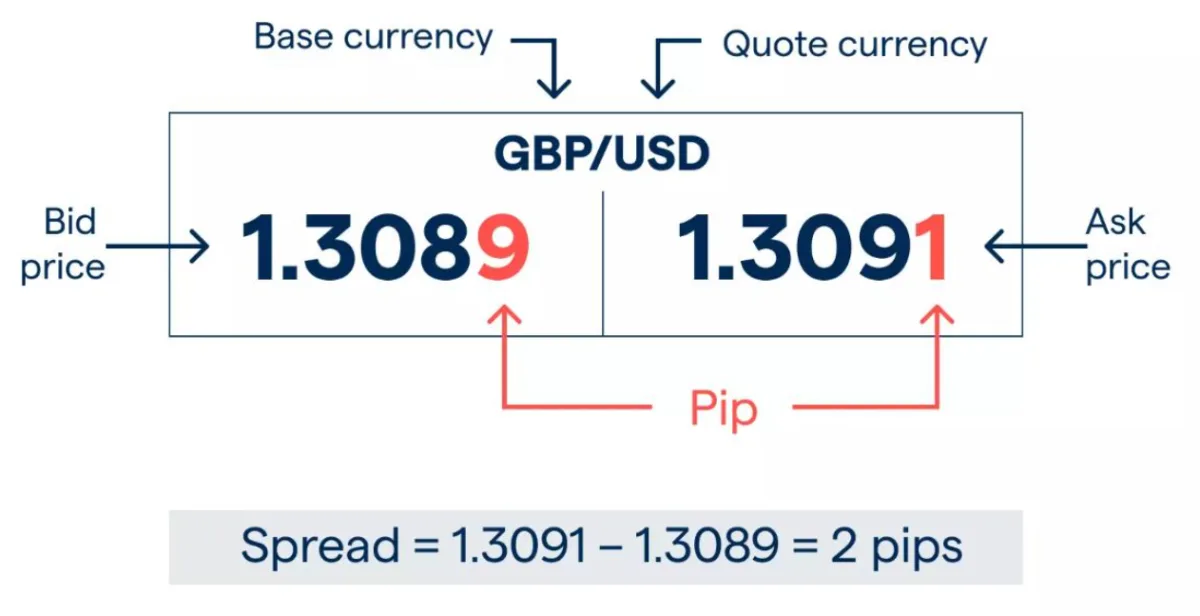
For example, suppose GBPUSD has:
- Bid: 1.3089
- Ask: 1.3091
- Spread: 2 pips
A Buy position opens at 1.3091, but the market would need to move favourably before the Bid reaches that entry price. The spread therefore creates an initial disadvantage.
This matters particularly for strategies with small profit targets. An EA targeting five pips per trade may be affected much more by a 2-pip spread than a strategy targeting 100 pips.
How MT5 handles spread
The MT5 Strategy Tester uses historical spread data rather than assuming one fixed spread for the whole test.
With Every tick based on real ticks, the spread comes from the historical Bid and Ask ticks, so it can change within a minute bar. With generated ticks, the tester uses the spread recorded for each minute bar.
To improve your test:
- Select the correct trading symbol and broker data.
- Choose a sufficiently detailed modelling method.
- Prefer Every tick based on real ticks when suitable historical tick data is available.
- Check that the historical spread conditions are representative of the account you intend to use.
Do not assume that a backtest using one broker's historical data will accurately represent another broker's trading conditions.
2. Include commission in your backtest
Commission is a trading fee charged by a broker, usually based on trade volume or turnover.
Some accounts charge commission separately from spread, while others offer commission-free trading with wider spreads. The exact arrangement depends on the broker and account type.
Consider an EA that opens and closes 1 standard lot of EURUSD. If the broker charges $3.50 per lot per side, the round-trip commission is $7.
If the EA completes 100 similar trades, that amounts to $700 in commission.
Ignoring this cost could make the strategy look considerably better than it really is.
How to configure commission in MT5
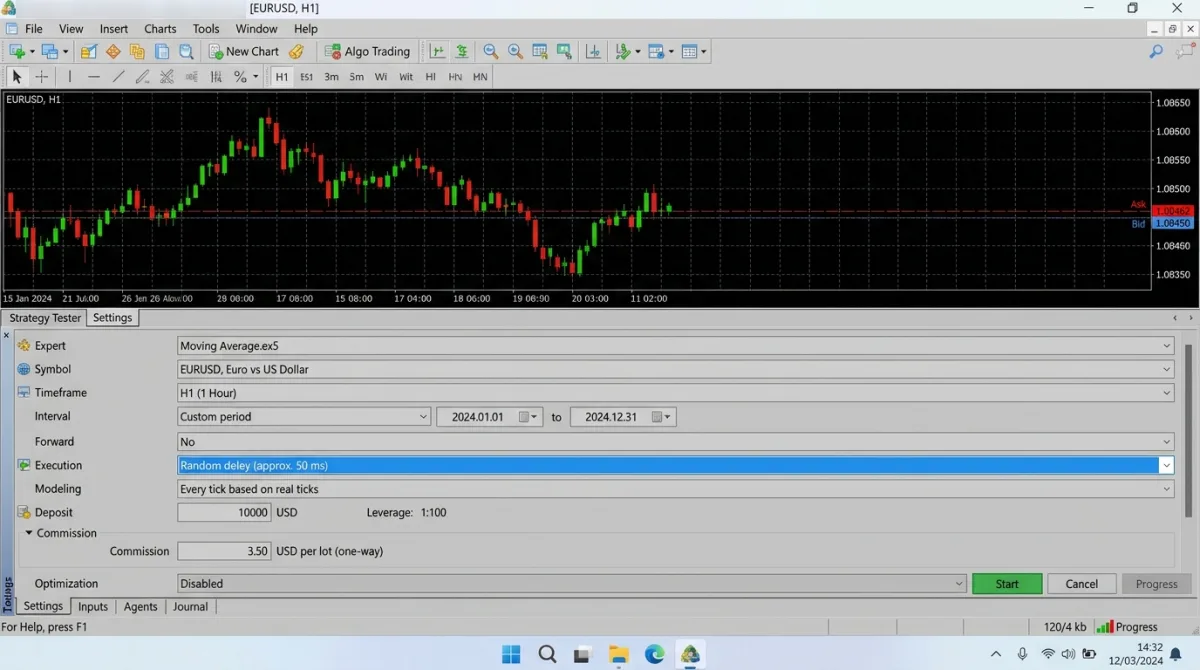
The Strategy Tester provides advanced settings for simulating trading commissions.
To review them:
- Open the Strategy Tester.
- Select your Expert Advisor and configure the test.
- Open the tester's advanced settings.
- Locate the Commission section.
- Enable Use predefined commissions if you want to use the current trading account's commission settings.
- Otherwise, configure custom commission rules that reflect the account you want to simulate.
MT5 supports different commission structures, including:
- Per-lot and per-deal charges.
- Single-level and multi-level commission rates.
- Charges on entry, exit, or both.
- Instant, daily, and monthly commission charging.
- Commission calculated in money, percentage, or points.
Make sure the configuration matches the broker's actual pricing model. A commission charged on both entry and exit should not be represented as a single one-sided charge.
3. Understand slippage and execution delays
Slippage occurs when an order is executed at a different price from the price expected when the trading request was submitted.
For example, an EA sends a Buy request at 1.08500, but the order is filled at 1.08508. The difference is eight points of adverse slippage on a five-digit EURUSD quote.
Slippage can occur because of:
- Rapid price movements.
- High-impact economic news.
- Low liquidity.
- Network latency.
- Delays between sending and executing a trade request.
The effect can be particularly significant for scalpers and EAs that depend on precise entry prices.
How MT5 simulates execution delays
The Strategy Tester includes an execution-delay setting that allows you to evaluate how delays between sending a trade request and its execution affect an EA.
You can choose:
- No Delay: Requests are executed at requested prices without requotes. This represents idealised execution.
- Fixed Delay: A predefined or custom delay is introduced before execution.
- Random Delay: The tester introduces randomly generated delays.
During a delay, market prices can change. This can affect execution prices and, under instant execution, may result in a requote if the price difference exceeds the permitted deviation. Requotes, Off Quotes and Invalid Price explains how an EA should handle them.
To configure it, open the Strategy Tester settings and locate the Execution setting. Select an appropriate delay rather than automatically using No Delay for every test. Note that Random Delay isn't available with the Open prices only model.
An important distinction: execution delay is not a universal slippage setting. It simulates the effect of delayed trade requests, but it does not guarantee that every real-world source of slippage, liquidity impact or broker execution behaviour is reproduced.
4. Use realistic tick modelling
The quality of historical price data also affects how accurately your EA's trading costs and execution conditions are represented.
MT5 provides several modelling options:
| Modelling method | Description |
|---|---|
| Open prices only | Uses bar opening prices; useful for preliminary testing of suitable strategies |
| 1 Minute OHLC | Uses four price points per minute |
| Every tick | Generates tick sequences from historical minute data |
| Every tick based on real ticks | Uses broker-provided historical tick data where available |
For strategies that depend on precise entries, stop-loss levels, take-profit levels, or intrabar price movements, real-tick testing is generally the preferred option when reliable data is available.
However, even real-tick testing does not guarantee that future execution will match historical execution. The quality of the underlying data and the broker's trading conditions still matter.
5. Test under different trading conditions
One backtest configuration is not enough to establish how an EA will perform across different account conditions.
Consider testing the same strategy under several realistic scenarios.
For example:
| Scenario | Spread | Commission | Execution delay |
|---|---|---|---|
| Idealised | Historical | Included | No delay |
| Normal | Historical | Actual account rate | Fixed delay |
| Challenging | Historical | Actual account rate | Random delay |
MT5's advanced testing options also let you test on a custom symbol with different specifications, such as volumes, trading modes, margin requirements and execution mode.
For spread, remember that the tester uses the symbol's historical spread data. Do not assume that changing the commission or execution-delay settings also changes the historical spread to match a different broker.
Compare the resulting net profit, profit factor, maximum drawdown, expected payoff, and trade count.
If a strategy only holds up under idealised execution conditions, that is an important warning.
6. Calculate the combined impact on results
The real cost of trading is not limited to one fee.
Spread, commission and execution differences all contribute to the difference between an idealised backtest and actual trading performance.
Consider a simplified example of an EA that completes 200 round-trip trades:
| Cost | Average per trade | Total |
|---|---|---|
| Spread cost | $1.20 | $240 |
| Commission | $7.00 | $1,400 |
| Adverse execution difference | $0.80 | $160 |
| Combined costs | $9.00 | $1,800 |
These are illustrative figures, not universal broker charges. Actual costs depend on the instrument, trade volume, account type, execution conditions and trading activity.
If the EA generates $3,000 in gross trading profit, these costs would reduce the result to $1,200 before any other applicable charges, such as swaps.
This is why evaluating net performance is more useful than focusing exclusively on gross profit.
Conclusion
A realistic MT5 backtest should account for the trading conditions an EA is likely to encounter outside the Strategy Tester. Why an EA works in the tester but fails live covers the other differences.
Use representative historical spread data, configure the correct commission structure, and test execution delays rather than assuming every order will be filled instantly at the requested price.
Where possible, use real-tick data and compare performance under different trading conditions. Then check the result isn't curve-fitted by testing it on data it wasn't optimised on.
The objective is not to make a backtest look impressive. It is to understand whether the strategy still has a viable edge after realistic trading costs are considered.
With PositionAlpha's Bot Builder, you describe your trading idea and the AI writes MT4 or MT5 code for you to review and test, with a plain-English explanation and setup steps. Backtest it with the costs above, and test it on a demo account before you rely on it.
Build a bot from your idea
Describe your trading idea and the AI writes MT4 or MT5 code for you to review and test, with a plain-English explanation and setup steps. Your first bot is free.